MovieBox Pro VIP – Complete Guide 2026

MovieBox Pro VIP is basically the paid upgrade for the MovieBox Pro app, which tons of people use to stream movies and shows. The free version comes with downsides like lower quality video, annoying ads, and some content locked away. Going VIP fixes all that: you get no ads at all, proper HD/4K (and sometimes even higher like 8K sources), smoother and faster playback, plus access to extra movies and shows that free users don’t see. It also handles multiple devices way better — phones, tablets, PCs, TVs, you name it.
This guide gives you the real scoop on what VIP actually delivers, how to grab it, what it costs, the good and bad sides, and some honest advice on staying safe with it in 2026.
What is MovieBox Pro VIP?
It’s the premium version of MovieBox Pro. You pay a bit to turn your regular account into something much nicer — cleaner look, no interruptions, higher quality streams, and some exclusive or early-drop titles.
With VIP you usually get:
- Full HD, 4K (and in some cases 8K) playback
- Movies and shows that free users either can’t get or get in worse quality
- Smooth streaming on Android/iOS phones, PCs (through web or emulators), and smart TVs
Upgrading basically makes the app feel way more polished and reliable, especially if you watch a lot.
Key Benefits of MovieBox Pro VIP

Exclusive Content
VIP unlocks trending movies, fresh series, limited-time premieres, and special collections that free accounts miss. If you hate waiting for the new stuff, this is a big reason to upgrade.
HD & 4K Quality
Most people switch for this — crisp, buffer-free high-res video that looks great on big screens, plus solid audio (including surround sound support). Free version often caps at 360p or so, so the jump is huge.
Multi-Device Support
Your login works across smartphones, tablets (Android & iOS), Windows/Mac computers, and smart TVs or streaming sticks. You can usually run it on 3–5 devices at the same time (depends on the current rules), which is perfect for switching rooms or sharing with family.
Ad-Free Viewing
No pre-rolls, no mid-rolls, no pop-ups while browsing — just pure watching. It changes everything when you’re in the middle of a binge.
Priority Updates and Features
VIP users get new app versions and features first — beta stuff, faster servers, extra categories. You’re always ahead of the free crowd.
MovieBox Pro Apk VIP Price and Subscription Plans
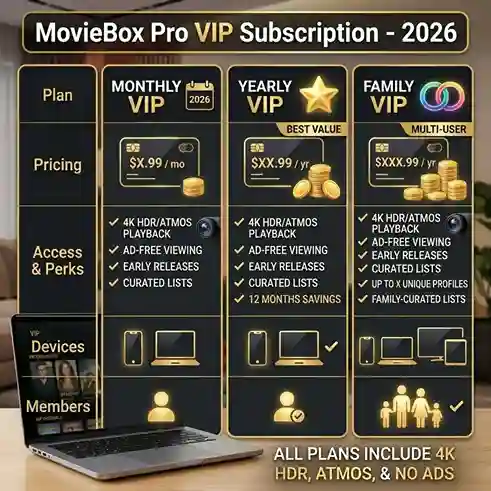
Prices shift a little depending on where you are or when you check, but from official sources, it’s usually around these numbers (check in-app for your exact rate, often in USD):
Monthly Plan
Great for trying it out or short-term use. You can cancel anytime, and it’s cheap enough for a quick season binge (around $3–$4/month).
Yearly Plan
Best bang for your buck — often around $23–$24 for the full 12 months (way cheaper than paying month by month). Full access plus occasional bonus perks.
Family Plan
Covers up to 5 independent accounts under one payment (costs a bit more, like an extra 50% on the base). Lets more people stream at once (up to 4 simultaneous screens) without issues — great if sharing with family.
Lifetime or Special Offers
You’ll see mentions of one-time lifetime payments in some places, but honestly just go with whatever shows up in the official app — skip sketchy “lifetime” deals from random sites.
Tip: Always buy straight from the official MovieBox Pro app or site (movieboxpro.app) to dodge scams and fake sellers.
How to Get MovieBox Pro Apk VIP
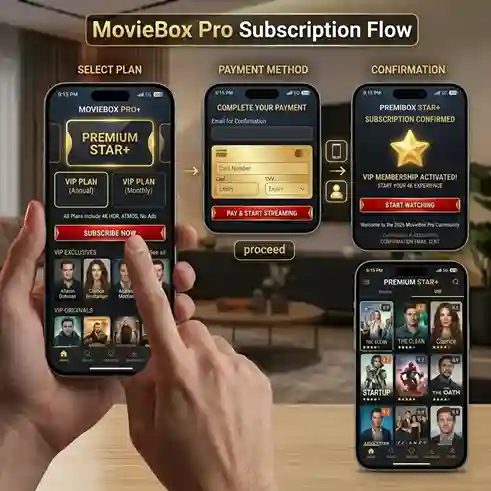
Step-by-Step (Safely):
- Download and open the official MovieBox Pro app (new users often need an invite code from a friend or online community to get in).
- Head to the VIP or account section inside the app.
- Pick your plan — monthly, yearly, family, whatever’s available.
- Pay through secure options like credit card, PayPal, or whatever the app offers.
- VIP kicks in instantly.
Safety Tips
- Only use the official app/site (movieboxpro.app) — stay away from third-party sites pushing “cheap VIP” accounts.
- Never share your login; it can get your account flagged or limited.
- Pick a strong password and keep the app updated.
- Keep in mind it’s a gray-area app — the content isn’t officially licensed like on Netflix, so legality depends on your country (like in Pakistan or elsewhere). Use it knowing the risks.
Pros and Cons
Pros:
- Completely ad-free with high-quality streams
- Big library including exclusives
- Works great across tons of devices
- Much cheaper than mainstream paid services for what you get
Cons:
- You still have to pay (even if it’s low)
- Sometimes needs an invite to join, and it’s not in official app stores
- Legal gray zone — streaming unlicensed stuff can be risky depending on where you live
- Sideloading the app has some security risks (stick to official downloads)
Tips to Maximize Your MovieBox Pro VIP Experience
- Use solid Wi-Fi (or download for offline) so you never deal with buffering.
- Set it up on every device you own for easy switching.
- Check out the VIP-only sections like trending and recommendations.
- Update the app regularly to get the latest fixes and new features.
FAQs About MovieBox Pro VIP
Q1: How is VIP better than free MovieBox Pro?
A1: No ads, full HD/4K (up to 8K sources), exclusive content, multi-device streaming, faster servers — it’s a massive upgrade overall.
Q2: Can I share my VIP account?
A2: Not a great idea — it can mess up logins or hit limits. Get the family plan if you need to cover multiple people.
Q3: What’s the price?
A3: Check in the app for your region, but it’s usually around $3–$4 a month or $23–$24 a year. Official prices show up there (family plan a bit higher).
Q4: How to get it safely?
A4: Only upgrade inside the official app with a secure payment method. Ignore random sellers.
Q5: How many devices can use it at once?
A5: Normally 3–5 (or up to 4 simultaneous streams on family plan), but it depends on the rules.
Final Thoughts
MovieBox Pro VIP really turns the app into something premium — ad-free, high-res streaming, exclusive stuff, and easy multi-device use — all for way less than Netflix or similar. If you’re already using MovieBox Pro and don’t mind the gray-area side (since the content isn’t fully licensed in most places), VIP makes it feel so much better. Just stick to the official way, keep things secure, and stream responsibly in 2026. If the legal or risk side bothers you, free legal apps like Pluto TV, Tubi, or Kanopy are always there as safe backups.